

TikFinity Mobile - Alerts&TTS
Version:2.3.1
Published:December 8 , 2025 11:12:31 AM
Introduction
What is TikFinity Mobile - Alerts&TTS?
TikFinity Mobile - Alerts&TTS is a dedicated mobile application designed to enhance live streaming on TikTok by integrating interactive sound alerts and Text-to-Speech (TTS) features directly from a smartphone. This tool empowers creators to engage their audience with customizable widgets, audio notifications, and visual overlays during broadcasts, all without needing a desktop setup. The TikFinity Mobile - Alerts&TTS app essentially brings studio-like streaming tools to mobile devices, making it easier for content creators to manage viewer interactions on the go.
Key Features of TikFinity Mobile - Alerts&TTS
The TikFinity Mobile - Alerts&TTS application includes several notable features that support dynamic live streaming:
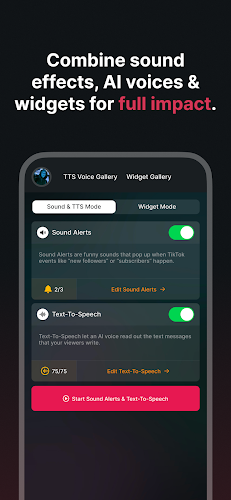
- Custom Alerts and Sounds: Users can set up personalized sound alerts triggered by viewer actions such as subscriptions or donations.
- Text-to-Speech (TTS): This feature reads out viewer comments in real-time, adding an auditory element to engagement.
- Widget Integration: The app offers popular widgets like Goal Bars, Emojify, and a Chat Widget that can be customized and overlaid on the live stream.
- Background Operation: TikFinity Mobile - Alerts&TTS runs continuously in the background, allowing uninterrupted streaming even when using other apps.
- Mobile Customization: All overlays, colors, text, and widget placements can be tailored directly through the mobile interface.
Why Choose TikFinity Mobile - Alerts&TTS?
TikFinity Mobile - Alerts&TTS stands out for its convenience and specialization in mobile-based TikTok streaming. Unlike desktop-dependent alternatives, this app eliminates the need for external hardware or complicated setups. Its always-on functionality ensures that alerts and widgets remain active throughout lengthy streams, providing consistent audience interaction. The TikFinity Mobile - Alerts&TTS tool is especially useful for creators seeking to boost production value and foster a more engaging, interactive viewer experience.
How to Download TikFinity Mobile - Alerts&TTS
TikFinity Mobile - Alerts&TTS is available for download on official app stores such as the Google Play Store and Apple App Store. Users should ensure they are downloading the official version of TikFinity Mobile - Alerts&TTS to avoid compatibility issues. Note that the app operates on a separate subscription model from its desktop counterpart, and existing TikFinity desktop settings will not transfer over.
Overview of the Latest Version’s New Features
The most recent update to TikFinity Mobile - Alerts&TTS includes improvements to stability and background performance, along with additional widget options. The rebranding from “TikStream” to TikFinity Mobile - Alerts&TTS also reflects a expanded focus on mobile accessibility and user-friendly customization.
Tips for Using TikFinity Mobile - Alerts&TTS
For optimal use, familiarize yourself with the widget editor to customize overlays before going live. Test sound levels and TTS settings to ensure clear audio delivery. Since TikFinity Mobile - Alerts&TTS operates in the background, make sure to enable necessary permissions for uninterrupted functionality during streams.
User Review
General user feedback highlights TikFinity Mobile - Alerts&TTS as a valuable tool for mobile-focused streamers, praising its ease of use and the professional touch it adds to live sessions. Some users note the learning curve involved in configuring widgets and sounds, but overall, the app receives positive remarks for enhancing viewer interaction.
Informations
Screenshots
.png)
.webp)


Comment List